 Reclaim
Docker ate your disk. Reclaim gives it back — to macOS, not just the VM.
docker prune only frees blocks inside the Linux VM Docker runs in.
The sparse disk image on your Mac never shrinks until an fstrim actually runs —
a step almost nobody triggers by hand. Reclaim runs both, then reports the real number: a host
free-space delta measured with statfs(), not Docker's own estimate.
Notarized Mac download coming soon.
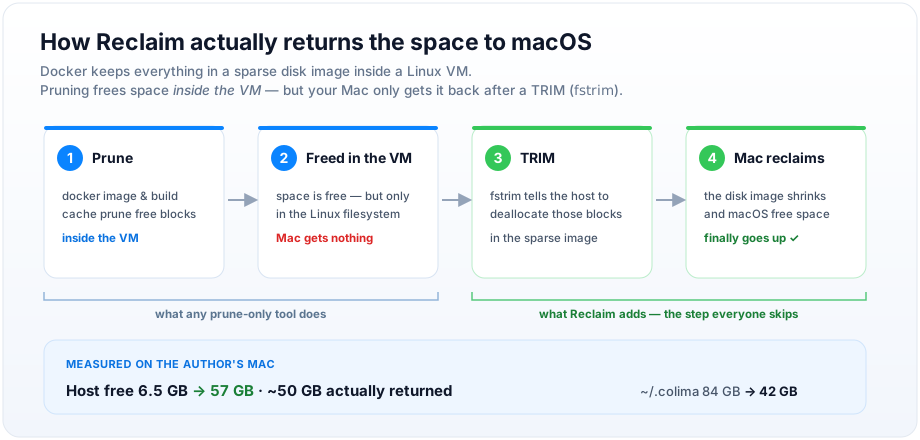
Prune frees space in the VM. Only a TRIM gives it back.
Docker on macOS runs inside a Linux VM backed by a sparse disk image. Pruning frees blocks inside that VM's filesystem — the sparse image file on your Mac doesn't shrink on its own. The fix is a second step almost nobody runs by hand.
Prune
docker image & build cache prune free blocks inside the VM.
Freed in the VM
Space is free — but only in the Linux filesystem. Your Mac gets nothing back yet.
TRIM
fstrim tells the host to actually deallocate those blocks in the sparse image.
Mac reclaims
The disk image shrinks and macOS free space finally goes up.
22.42 GB “reclaimable.” 2.68 GB actually freed.
Docker's own RECLAIMABLE column is frequently wrong: images share layers on disk, so the space Docker attributes to each image individually isn't summable. Reclaim always shows the number your Mac's Finder would agree with — never Docker's own estimate.
Volumes are read-only. Always.
This tool touches a Docker daemon and shells out to a VM. The rules below aren't style preferences — they're the difference between freeing disk space and deleting someone's database.
docker volume prune isn't just disabled — it's unrepresentable in the code. The only Docker API calls Reclaim's client can make are a fixed, public set (image prune, build cache prune, container prune, and read-only listings). The request layer that sends them independently rejects any mutating call whose path touches a volume, or any system-wide prune, as a second, redundant check.
A live Postgres volume with no running container attached looks identical to garbage from Docker's perspective. Reclaim's answer is to not let the question come up.
Small surface. No surprises.
One menu bar app, one CLI, the same core underneath.
One-click clean
Prune, then trim, in a single action. No terminal required — the menu bar app runs the whole two-step dance for you.
The real number
A statfs() delta measured before and after — never Docker's own reclaimable estimate.
Menu bar awareness
The icon shows live free space, and ambers, then reds, as your disk fills — so you notice before it's an emergency.
Plain-language panel
No jargon dump. Reclaim explains what it's about to do, and why, in a sentence a human wrote.
Live progress log
fstrim can take a while on a large volume. Reclaim streams what's happening instead of leaving you at a spinner.
Weekly schedule
Turn on a weekly run via SMAppService and forget about it — Reclaim keeps the VM's disk image lean in the background.
Full CLI
status · clean · trim · volumes · history — everything the app can do is also a scriptable command.
Detected automatically, handled correctly.
Reclaim checks each backend's socket in order and confirms it's live with a Docker Engine API ping before using it.
Colima
Trims via colima ssh -- sudo fstrim -av.
Rancher Desktop
Trims via rdctl shell -- sudo fstrim -av.
Docker Desktop
Recent versions auto-TRIM on idle — Reclaim detects this and tells you instead of doing extra work.
OrbStack
Reclaims disk space natively. Reclaim detects this and reports it, rather than pretending to add value.
Get your disk back.
Free, open source, and honest about what it can't do.
Notarized Mac download coming soon.
Not on the App Store, and can't be — the App Sandbox forbids both shelling out via Process and arbitrary Unix domain socket access, and both are load-bearing for this app to work at all. Build from source using the instructions above — a notarized download is coming soon.